Why Mobile Matters So Much for Tradie Websites
Australian web traffic is split roughly evenly between phones and desktops, but the search that turns into a tradie job happens on a phone, right next to the problem. Here's what the Australian numbers actually say, why Google ranks the mobile version of your site, and how to test it from the driveway.

Mitchell Gibb
Founder
On this page
Key takeaways
- The job decides the device — Australian web traffic overall is roughly half mobile and half desktop, but urgent tradie searches happen on a phone, next to the problem. ACMA found 97% of adults went online on a mobile phone in 2025.
- Google indexes the phone version — Google uses the mobile version of your site for indexing and ranking. A phone number, suburb list or gallery missing on mobile is missing for Google too.
- Pass the thumb test — The first screen should show the job, the area and a Call button. Text should be readable without zooming, and a sticky Call and Text bar should stay under the thumb.
- Speed is a missed call, not a score — Compress job photos, stop banners pushing the Call button down, and check Core Web Vitals on the mobile tab in Search Console.
- Test where the customer is — Switch off Wi-Fi, open a private tab and test on mobile data from the driveway, on both an iPhone and an Android phone.
A hot water system doesn't fail while someone is sitting at a desk. It fails at 6am, and the homeowner is standing in the laundry in thongs, phone in one hand, searching for a plumber. They'll open two or three results, give each one a few seconds, and ring the first business that makes calling easy.
That is why mobile matters so much for tradies. Not because of a big national percentage, but because the moment that turns into a job happens on a small screen, with one free thumb, often on patchy 4G. This guide covers what the Australian numbers really say, why Google ranks the phone version of your website, what the first screen needs, and how to test your own site the way a customer will use it.
Why mobile matters: the search happens next to the job
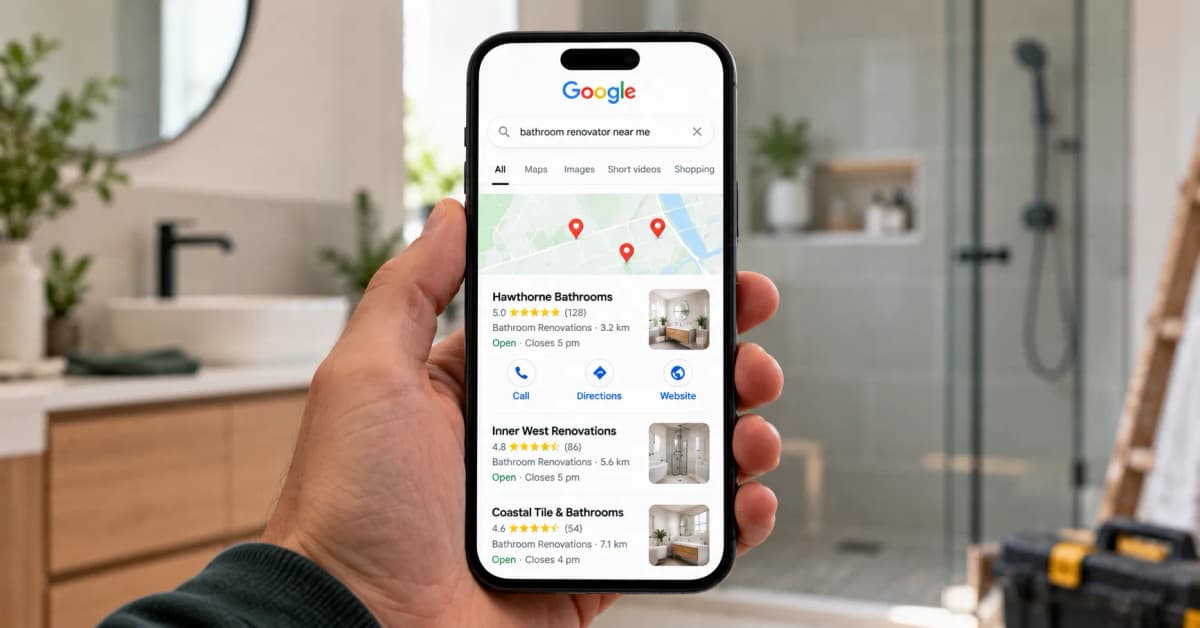
Most trade work starts with a problem the customer can see. A safety switch that keeps tripping, a blocked drain, water through the ceiling, a garage door stuck half open. The search happens right there, and the customer decides whether to call within a few seconds of the page opening.
In that moment they aren't reading your About page. They want three answers: do you do this job, do you cover my suburb, and how do I ring you. If the phone number is tucked inside a menu, the page is still loading photos, or a pop-up covers the screen, they press back and tap the next result. That lost job never shows up in a report. It's just a call that went to someone else.
Planned work is often researched on a phone too, on the couch after dinner, but with more patience. Urgent work is where a poor mobile site costs a plumber or electrician the most.
What the Australian numbers actually say
Two sources are worth knowing, and they measure different things.
People. ACMA's research released in February 2026 found internet access among Australian adults was almost universal in 2025, at 99.7%. The share going online on a mobile phone rose to 97%, from 95% in 2024, and daily mobile internet use rose to 92%, from 90%. Only 12% of adults used a landline phone. The person ringing about a burst pipe is almost certainly on a smartphone.
Page views. Statcounter's platform figures for Australia show all web traffic in September 2026 split almost evenly: 48.54% mobile, 48.45% desktop and 2.94% tablet. That covers every kind of site, including the office work, banking and study that still happens on a laptop.
So the honest picture is this: Australian browsing overall is roughly half phone, half desktop, but nearly every adult has a phone in their pocket and uses it daily. For a trades business, the job decides the device. A homeowner with a problem in front of them searches on the phone in their hand.
Google ranks the mobile version of your website
Since Google announced on 31 October 2023 that its move to mobile-first indexing was complete, the phone version of your site is the one that counts. Google's documentation says it uses the mobile version of a site's content, crawled with its smartphone agent, for indexing and ranking.
That changes what "looks fine" means. A site that looks finished on a laptop but trims things on a small screen is showing Google the weaker version. The usual culprits on tradie websites:
A phone number in the desktop header that disappears from the mobile header.
The list of suburbs or services cut from the mobile layout to save space.
A job gallery that only loads when someone taps "Load more". Google says it won't load content that needs a swipe, click or tap to appear.
Shorter or different headings on mobile than on desktop.
Accordions and tabs are fine, as long as the content inside them matches the desktop page. Google recommends responsive design, which serves the same HTML on the same URL and simply rearranges it for the screen, because it's the easiest setup to build and maintain. If your service area pages are part of how you win work, our guide to local SEO for Australian tradies explains why the suburb content needs to be there on every device.
The first screen, with one thumb
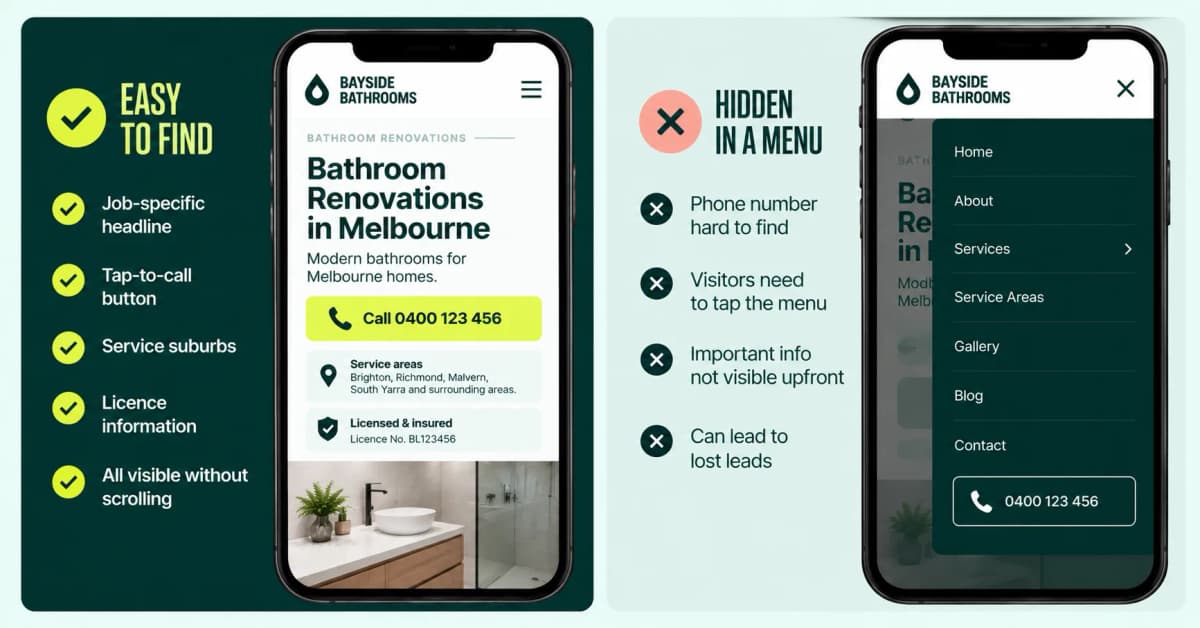
The first screen on a phone, everything visible before a scroll, has to answer the customer's three questions. It needs:
The job and the area in the headline, such as "Emergency electrician, Northern Beaches".
A large Call button that dials straight away.
Your licence number, your Google rating and two or three suburbs you cover.
"Quality workmanship you can trust" can wait further down the page. So can the full services list, the gallery and the FAQ.
Now picture how the page is actually used. One hand is on the phone. The other is holding a torch, a bucket or a toddler. The thumb might be wet. That's the thumb test:
Can you read the text without pinching to zoom?
Can you hit the Call button with your thumb without hitting the link next to it?
Is the navigation short and simple, with the phone number outside the menu rather than inside it?
Our article on tradie website conversion goes deeper on button wording, trust signals and when to lead with the call or the quote form.
Tap to call, a bar that stays put, and no voicemail dead end
Every phone number on the site should be a tap-to-call link. A number typed as plain text, or worse, baked into an image, makes the customer copy it by hand. An image also can't be read by Google.
The header number scrolls out of view as soon as someone starts reading your reviews. On mobile, fix a slim bar to the bottom of the screen with Call and Text, so the button is under the thumb the moment they decide. SMS matters more than many tradies think: it lets someone send a photo of the leak while they're stuck in a meeting.
Then make sure the call goes somewhere. A tap that ends in voicemail during business hours is a lost enquiry. Show your answering hours next to the button, and if you're on the tools, set up a missed-call SMS so the customer knows you'll call back that day.
Speed, photos and layout shift on a poor mobile connection
The usual reason a tradie page stalls on 4G isn't the hosting. It's the photos. A job photo straight off a modern phone camera can be several megabytes, and a gallery of twenty of them will crawl on one bar of signal. Resize photos to the width they're actually shown at, compress them, and use a modern format such as WebP.
Google's Core Web Vitals report in Search Console measures three things from real visits, reported separately for mobile and desktop. A page group is rated Good when:
Metric | What it measures | Good |
|---|---|---|
Largest contentful paint (LCP) | How long the main content takes to appear | 2.5 seconds or less |
Interaction to next paint (INP) | How quickly the page responds to a tap | 200 milliseconds or less |
Cumulative layout shift (CLS) | How much the page jumps around while loading | 0.1 or less |
The same report suggests keeping a page and all its resources under 500KB where possible, and limiting a page to 50 resources for best performance on mobile. It also notes the data combines visits from everywhere, so customers on slow connections pull your results down. For a tradie working regional areas or new estates with weak coverage, that's exactly the point.
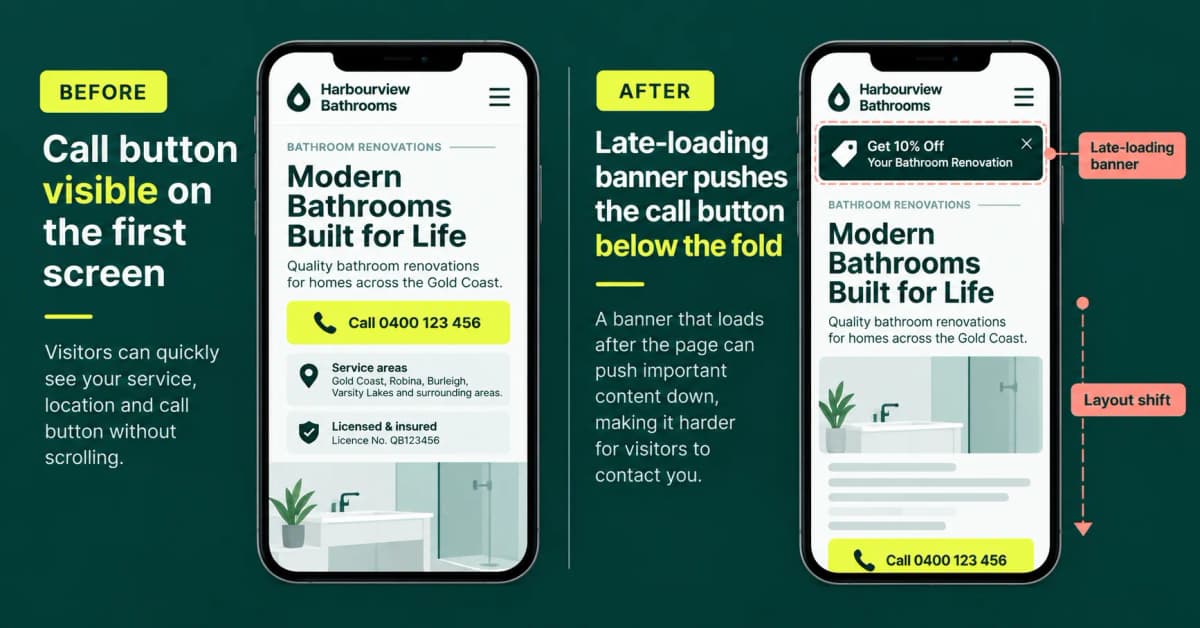
Layout shift deserves its own mention. A banner, cookie notice or review widget that loads late and pushes the Call button down the screen means the customer taps where the button was and hits something else. That's a missed call, and it's one of the three Core Web Vitals. Ask your developer to reserve space for images and banners so nothing moves once the page appears, and to set sensible browser cache rules so return visits load faster.
One caution: a perfect PageSpeed score doesn't book jobs. The test that matters is whether a person on a phone can see the job and tap Call in the first few seconds.
Forms that work on a phone
Most enquiry forms are built and checked on a desktop, then never filled in on a phone until a customer tries. On a small screen, every field is more typing with one thumb. Keep it to what you need to call back and quote:
Name, mobile, suburb and job type, with photo upload and a message box both optional.
A phone field that opens the number keypad, and fields that let the phone's autofill do the work.
A Send button that isn't hidden behind the keyboard or the sticky bar.
Error messages that point to the problem without wiping what the customer has already typed.
A confirmation that says what happens next, such as "We'll call you back today before 5pm."
Photo upload is worth testing in particular. A homeowner who can send a picture of the switchboard straight from their camera roll gives you a better quote and saves a wasted trip.
How to test your mobile website from the driveway
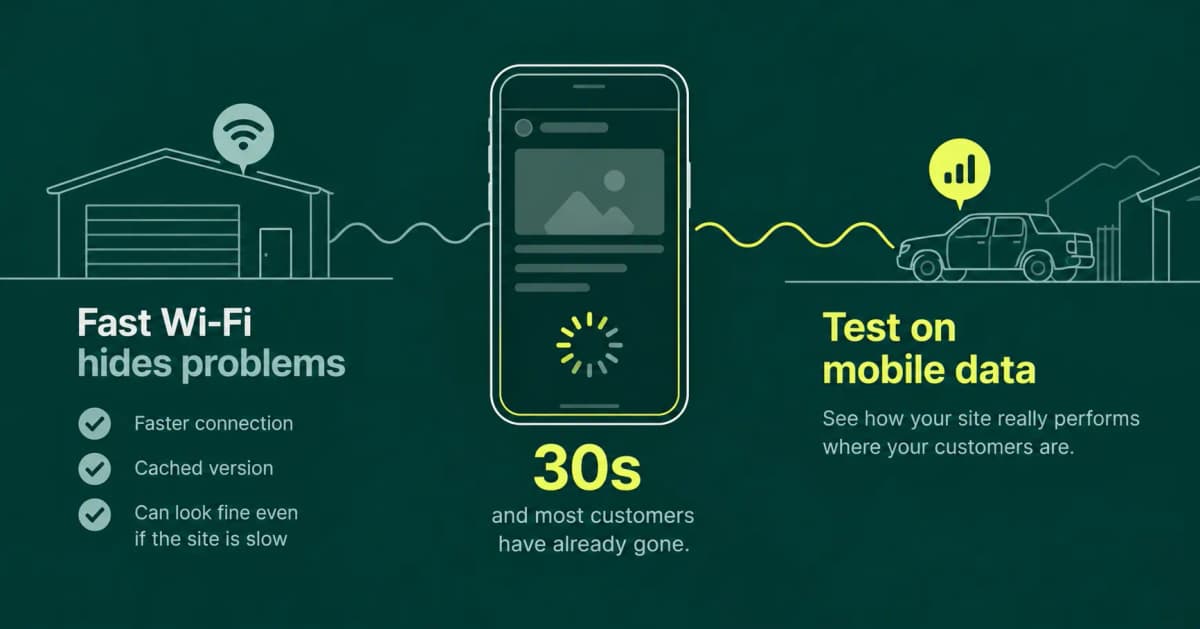
Testing on the office or workshop Wi-Fi hides most mobile problems. The connection is fast and the phone has probably cached your site from last time. Test it where your customer is instead:
Switch off Wi-Fi. Stand in the driveway, sit in the ute or go to a job site with average signal, and use mobile data.
Open a private tab so the phone isn't loading your site from cache.
Search like a customer, such as "blocked drain" plus your suburb, and tap your own result.
Count the seconds until you can see the job, the area and the Call button. If you're still waiting at 30 seconds, most customers have already gone.
Use one thumb. Can you read without zooming and reach Call without stretching?
Tap Call and check the right number appears in the dialler, on an iPhone and an Android phone.
Send the form on mobile data, with a photo attached, and check it actually arrives.
Scroll the page and check the sticky bar stays put and nothing covers it.
Then back it up with the numbers: the mobile tab of the Core Web Vitals report in Search Console for real-world data, and PageSpeed Insights on the mobile setting for a specific page.
What a slow mobile page does to your Google Ads and map listing
Paid clicks and free ones land on the same small screen.
On Google Ads, the landing page is part of how Google judges your ad. Google's help on ad quality says higher quality generally means better ad positions and lower cost, and that low-quality ads may pay close to their maximum cost per click even when competition is light. Google's own landing page advice is to keep mobile pages quick, make it easy to contact you, use simple navigation, put important information near the top and avoid cluttering the page with pop-ups. A page that stalls on 4G wastes a click you've already paid for. Our guide to Google Ads for Australian tradies covers the rest of the setup.
The map pack works the same way. When someone taps Website on your Google Business Profile, they land on your site on the same phone, in the same hurry. A slow page throws away a free enquiry your profile worked hard to earn.
What not to add: things that hide the Call button
Some of the most common add-ons on tradie websites make the mobile experience worse:
Chat bubbles that sit on top of the sticky Call bar. A chatbot can't send anyone to a burst pipe.
Suburb pickers that pop up before the page shows anything.
Full-screen offers and newsletter sign-ups that cover the page on arrival.
Autoplay video in the hero section, which eats data and delays the Call button.
Google's guidance on interstitials and dialogs says intrusive overlays can frustrate users and make content harder for search engines to understand, and recommends banners that take up a small fraction of the screen instead. If you need to show an offer, a slim banner does the job without covering the number.
Mobile-friendly website checklist for tradies
First screen on a phone shows the job, the area and a Call button, with no scrolling.
The phone version has the same services, suburbs, headings and photos as the desktop version.
Every phone number is a tap-to-call link in +61 format, tested on iPhone and Android.
A slim sticky bar with Call and Text stays on screen while people scroll.
Answering hours shown next to the button, with a missed-call SMS when you can't pick up.
Text readable without zooming and buttons big enough for a wet thumb.
Job photos resized and compressed, with nothing loading only on a tap.
No late-loading banner or widget that pushes the Call button down.
Core Web Vitals checked on the mobile tab in Search Console.
Quote form with four fields, an optional photo upload and a Send button that isn't hidden.
No chat bubble, pop-up or full-screen offer covering the Call button.
Site tested on mobile data in a private tab, from the driveway, not the office Wi-Fi.
Your website doesn't need to win a design award on a 27-inch monitor. It needs to work in a laundry, a driveway and a ute, on one bar of 4G, for someone with a problem and one free hand. Run the driveway test this week and fix the first screen before anything else. If you'd rather have someone else do it, our web design team builds and reworks trade websites for the phone first, and our local SEO work makes sure the version Google indexes is the one that wins you calls in your suburbs.
Frequently asked questions
Does the desktop version of a tradie website still matter?
Yes. Statcounter's September 2026 figures put desktop at about half of all Australian web traffic, and commercial clients, property managers and people planning a renovation often compare quotes on a laptop. Responsive design serves both from the same page, so build and check for the phone first, then make sure the desktop layout still reads well.
Is a sticky call button better than a phone number in the header?
Use both on mobile. The header number scrolls out of view as soon as someone starts reading, while a slim bar fixed to the bottom of the screen keeps Call and Text under the thumb the whole time. Keep the bar small so it doesn't cover the page, and make sure nothing else, like a chat bubble, sits on top of it.
How fast does a tradie website need to load on a phone?
Google's Core Web Vitals report rates a page as Good when the main content appears in 2.5 seconds or less, the page responds to a tap in 200 milliseconds or less, and layout shift is 0.1 or less, measured from real visits. In practice, test on mobile data: if you can't see the job, the area and the Call button within a few seconds, the page needs work.
Why does my website look fine on Wi-Fi but slow on my phone?
Office and home Wi-Fi is usually much faster than mobile data in a laundry, a driveway or a regional job site, and your phone has probably cached your site from earlier visits. Large job photos, sliders and extra scripts that load quickly on Wi-Fi can stall on 4G. Test with Wi-Fi off, in a private tab, to see what a new customer sees.
Is a separate mobile site or a mobile app worth building?
Usually not. Google recommends responsive design, one page that adapts to the screen, because it's the easiest to build and maintain. A separate mobile site needs extra technical setup to keep content matched, and Google indexes the mobile version either way. A customer with a blocked drain won't download an app to call you, so the money is better spent making your existing pages fast and easy to use on a phone.